IKA DRIFT Strategy Guide: Filling Boost with Drifts, Rocket Starts and Earning All 3 Stars
IKA DRIFT is a 3D drift racing game where the car speeds up on its own, and the only buttons are DRIFT, Left/Right, HANDBRAKE and BOOST. The controls are simple, but where you drift and when you boost make a big difference to your time and your position. In this guide we, the makers at IKA LAB, explain the basics every new player should know, based on how the game really works. The harder modes and the finer numbers will get their own advanced guide later.
Reading the screen, and the six buttons
The car speeds up on its own, so once the race starts it moves forward by itself. If you hold your phone upright, the 3D course is at the top and the buttons are at the bottom. The pink buttons at the far left and far right are DRIFT (left and right), the two white buttons between them are Left and Right, the red button below is HANDBRAKE, and the light blue one is BOOST. You can press as many buttons at once as you like.
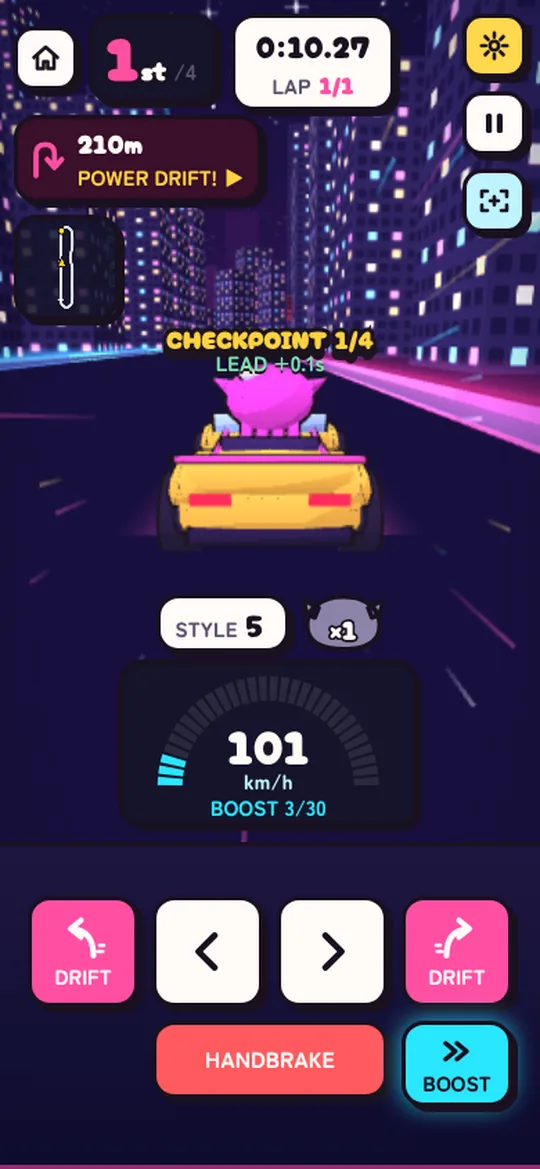
At the top of the screen you can see your position (out of 4 cars), your time and lap, and the Navi in the top left. The Navi shows the direction of the next corner, how far away it is, and the technique that suits it (GRIP, DRIFT or POWER DRIFT!). Under the Navi is the mini map. The meter in the middle shows your speed and your stored boost (max 30).
The white Left and Right buttons move the car a little to the side and turn it back straight along the road. On a computer, use ← → or A and D to steer, Z or Q to drift left, X or E to drift right, Space, ↓, S or C for HANDBRAKE, ↑, Shift, W or R for BOOST, and P or Esc to pause.
Fill your boost with drifts and Power Drifts
In a corner, hold a DRIFT button down. You keep drifting while you hold it, and when you let go the slide settles and you go back to normal driving. While drifting, pressing the white button on the same side as the drift turns you in deeper, and pressing the opposite side gives a shallower, wider line.
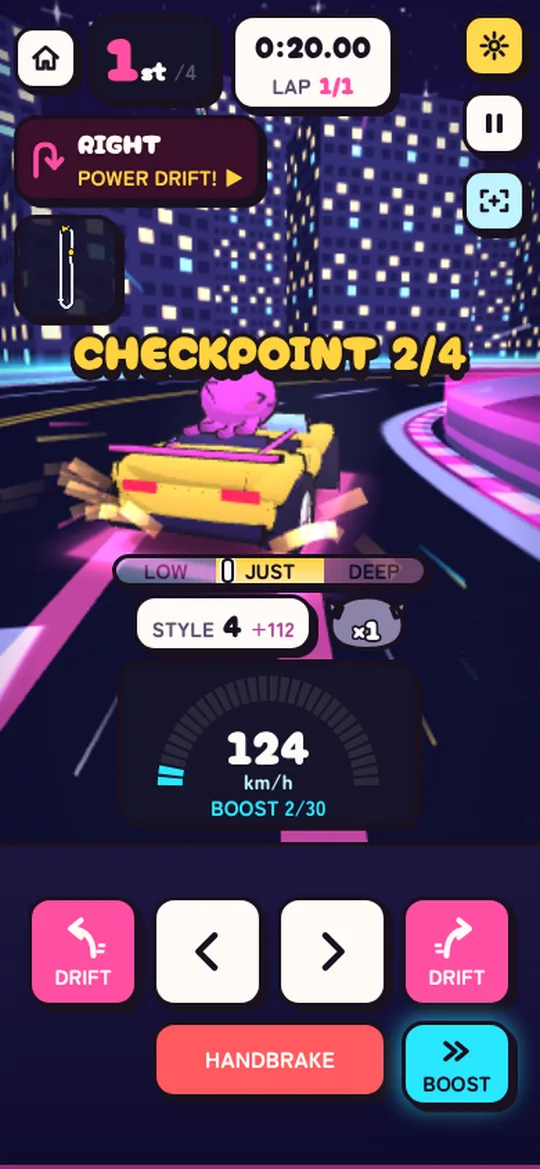
Boost is added when a drift ends. However, drifts shorter than 0.45 seconds, and drifts that touch a wall on the way, add no boost. Touching a wall also wipes out the style points you were building in that drift, and your combo multiplier goes back to ×1.
Press HANDBRAKE together with a white Left/Right button or a DRIFT button for a POWER DRIFT!, which turns much more sharply. You lose speed more easily, though, so save it for tight corners where the Navi says POWER DRIFT!. Pressing HANDBRAKE alone slows you down, but never below about 115 km/h. Here is how much boost one drift adds:
- Normal drift: +2
- Power Drift (holding HANDBRAKE for 0.2 seconds or more during the drift): +5
- If the car is almost straight along the road when you let go: PERFECT! and +1 more
- You can store up to 30
Mini turbos, and when to boost
Keep a drift going and the sparks from your tires change color: blue after 1 second, orange after 2 seconds and purple after 3.2 seconds. Let go of DRIFT, or flick into a drift the other way, while a color is showing and you get a MINI TURBO: a strong push for 0.5 seconds (blue), 0.9 seconds (orange) or 1.4 seconds (purple). A mini turbo does not use your stored boost.
Stored boost is used only while you hold BOOST. With the first car (Grip type) the gauge drops by 6 per second, so a full 30 lasts about 5 seconds. If you boost while drifting, it drops half as fast. Start boosting with 25 or more in the gauge and you get a Perfect Boost, which is a little faster than a normal boost.
Stay right behind another car (4 to 24 m back) for about 0.6 seconds and SLIPSTREAM! appears: you go a little faster and your boost slowly fills. Boosting makes you faster, which also makes it easier to hit walls in corners, so we recommend boosting on the straights after a corner.
From the start to the finish line
A race starts with a 3-2-1 countdown and then GO!. For a rocket start, press BOOST right as the count changes from 2 to 1. Press it anywhere from 0.3 seconds before to 0.3 seconds after that moment and you get ROCKET START!, a strong push for about 1.3 seconds after GO.
Any earlier and you see Too early!, and your car stalls for 0.5 seconds after GO. Holding BOOST from the start of the countdown also fails. Later than 0.3 seconds after the 1 appears is A bit late, and pressing after GO! appears does not give a rocket start at all.
Each lap has 4 checkpoints. Pass them in order and a banner shows your time gap to the leader or to 2nd place. Normal courses are 2 laps, and FINAL LAP! appears when you start the second one. The first course is 1 lap, and the mountain passes are a single run, downhill or uphill. Drive the wrong way and you see WRONG WAY!.
After the finish line you see FINISH!!! and then your results. Your position is decided among 4 cars: you and the 3 rivals. When you set a new personal best time, that run is saved as a ghost, and the next time you race that course a ghost car drives with you.
How to earn all 3 stars
Every course has 3 stars. The first is for finishing (your position does not matter), the second for beating the target time, and the third for reaching the target style points in one race. Once you earn a star it stays, even if a later run misses it.
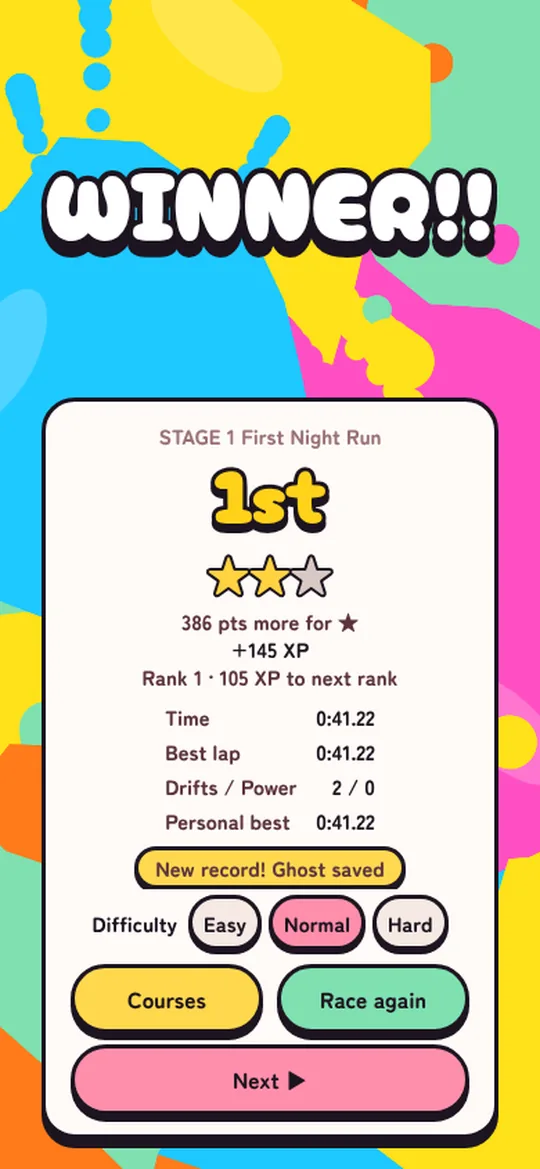
The results screen shows the stars you have and how far you are from the rest, in lines such as "… s more for ★" and "… pts more for ★". The target time and target style points are set for each course from its length and how many corners it has. The reverse version of a course counts as a separate course with its own 3 stars.
Style points grow with the drift angle, your speed and how long the drift lasts. While drifting, a LOW / JUST / DEEP bar appears, and you earn extra points while you stay in JUST. If the last drift lasted at least 0.45 seconds and ended without touching a wall, linking the next drift within 2.5 seconds raises the multiplier, to a maximum of ×5.
You can also earn stars in TIME ATTACK and DRIFT SCORE ATTACK, where there are no rivals. If the time star is giving you trouble, try Time Attack; if you are short on style points, try Drift Score Attack. Focusing on one goal is the quickest way.
Your first courses, and opening new areas
The first time you play, the biggest button on the title screen, RACE, says "Your first race". Press it to drive First Night Run, a short course of just 1 lap. Short tips also appear as you drive: in your 1st race a drift tip before the first corner, and in your 2nd race a boost tip once you have some boost.
After that, the RACE button starts from Stage 1, Shinjuku Twilight. You stay on the same course until you finish 1st, then move on to the next numbered course. On the results screen of your very first race you can also pick how strong the rivals are (Easy, Normal or Hard). You can change the difficulty and the steering assist later in Settings.
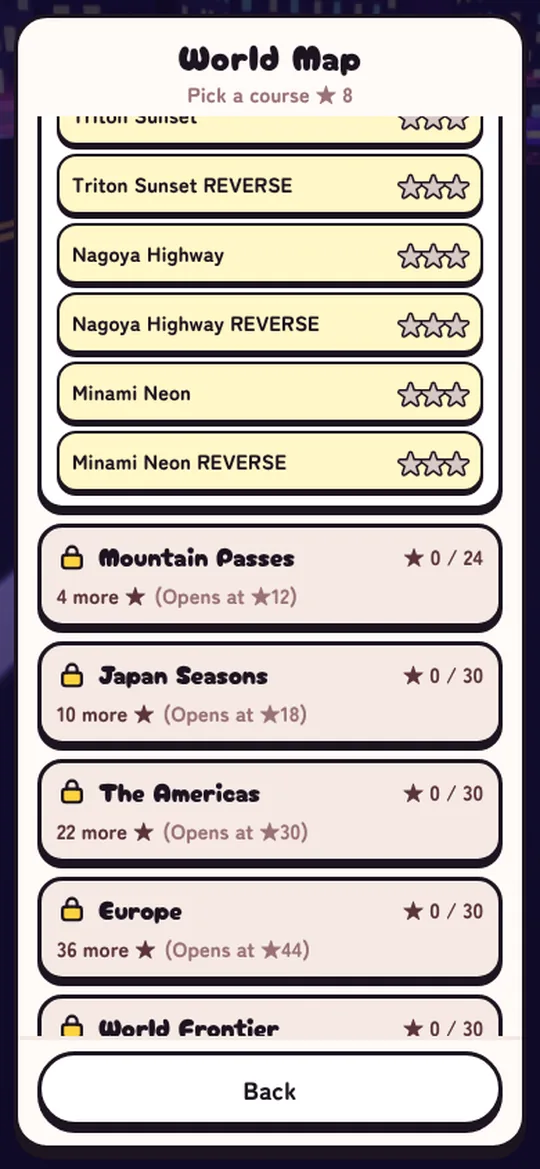
On the World Map (the Map button), courses are grouped into areas. From the start you can race the 5 courses of Tokyo Nights (Shinjuku Twilight, Shibuya Scramble, Rainbow Night, C1 Tunnel Loop and Aqua-Line Sunrise), each also in reverse.
From Modes you can also race Cups, 3-race contests for points (1st 9 · 2nd 6 · 3rd 3 · 4th 1). The more you drive, the more XP you earn and the higher your rank: the Drift car unlocks in the Garage at Rank 3 and the Boost car at Rank 6. Other areas open with your total stars, as follows:
- Japan Cities: ★8
- Mountain Passes: ★12
- Japan Seasons: ★18
- The Americas: ★30
- Europe: ★44
- World Frontier: ★60
- Seas & Islands: ★78


